Connections
The Connections modal in Synergy IDE allows you to manage external data connections for your project.
Overview
This modal helps define and manage reusable connection configurations for integrating Synergy forms and flows with external systems such as REST APIs, databases, or SAP.
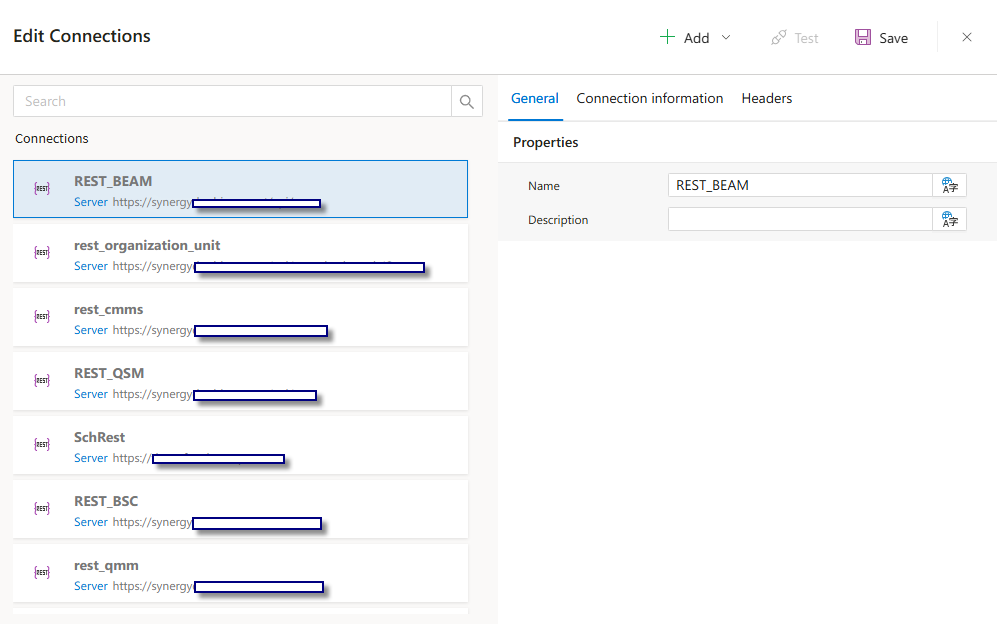
Each connection is listed on the left. Selecting a connection opens its editable properties on the right side.
Modal Sections
The modal contains the following sections:
Search Bar:Allows searching existing connections by nameConnection List:Lists all created connections (REST, ODBC, SAP, etc.)Connection Properties:ShowsNameandDescriptionof the selected connectionTabs:General:Basic info (name/description)Connection Information:Configuration fields (type-specific)Headers:HTTP headers (if applicable)
Toolbar Options
Add:Creates a new connectionTest:Verifies connection configurationSave:Persists the current connection setupClose (X):Exits the modal without saving
Example Screenshot
Supported data source types include:
REST APIsMicrosoft SQL Server (MSSQL)MySQLOracleODBC (Generic)SAP (RFC Connections)
Each type has unique fields such as base URL, credentials, headers, or connection strings.
See Also
- #linkDocument (DeveloperGuides.IDE.TopMenu.Tools.Connections)
- #linkDocument (DeveloperGuides.IDE.TopMenu.Tools.Connections.FAQs)
- #linkDocument (DeveloperGuides.IDE.TopMenu.Tools.Connections.HowTos)
FAQs
- What ODBC driver should I use?
- Can I use Windows Authentication for MSSQL?
- What is the difference between SID and Service Name in Oracle?
- How to access an RFC function module in SAP?
- What HTTP methods are supported in REST connections?